jQuery soap插件(jQuery呼叫.Net web service用)的使用方法
**IE瀏覽器**
網際網路選項→安全性→所對應的區域→自訂等級→存取跨網域的資料來源→啟用
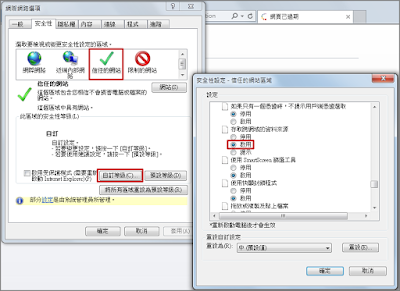
引用如下:
<script src="https://ajax.googleapis.com/ajax/libs/jquery/1.12.4/jquery.min.js"></script>
<script src="http://cdn.zoanmgtinc.com/j_query/plugin/soap/jquery.soap.js"></script>
方法如下:
$.support.cors = true; /**修正"no transport"問題(for IE8, http://bugs.jquery.com/ticket/10660)*/
$.soap({
url: "http://xxx.xxx.xxx.xxx/WebSite1_T/Service.asmx",
method: "<方法名稱>",
SOAPAction: "http://tempuri.org/<方法名稱>",
envAttributes: {
"xmlns": "http://tempuri.org/"
},
data: {
Code: "", /**參數1*/
Display: true /**參數2*/
},
appendMethodToURL: false,
async: false,
success: function (soapResponse) {
/**成功時解析soapResponse的內容*/
/**建議用$(soapResponse.toString())轉成jQuery的xml物件以利操作*/
},
error: function (soapResponse) {
/**失敗時soapResponse會顯示伺服器回傳錯誤訊息*/
}
});
在web service伺服器的web.config的
<system.webServer>
<httpProtocol>
<customHeaders>
<add name="Access-Control-Allow-Origin" value="*" />
<add name="Access-Control-Allow-Headers" value="content-type, soapaction" />
<add name="Access-Control-Allow-Methods" value="*" />
</customHeaders>
</httpProtocol>
</system.webServer>asp.net, jquery, web service — 2018年11月6日
Search
Made with ❤ and at Taiwan.